


In the rush to integrate Large Language Models (LLMs) into localization workflows, the industry has hit a common ceiling: unpredictability. Standard prompts often ignore glossaries, hallucinate technical tags, or lose the established brand voice.
Moving away from raw LLM outputs
Relying on a single, massive prompt for translation is a high-risk strategy. Even when an LLM produces a linguistically “correct” translation, it often fails at the technical level – breaking critical {user_name} placeholders or ignoring the specific formal register that localization teams have spent years establishing through manual translation. The black box approach lacks the guardrails needed for production-ready code.
From monolithic prompts to modular workflows
To solve this, Crowdin has moved away from the idea of a single translation prompt. Instead, the process is broken down into a series of specific, logical steps. This is the core philosophy behind the AI Pipeline app by Crowdin. By using specialized agents for context, adherence, and safety, the platform catches and fixes technical issues before they reach the final string.
Rather than forcing every piece of text through the same rigid process, Crowdin bundles these modular steps into distinct presets tailored for different content types and business goals.
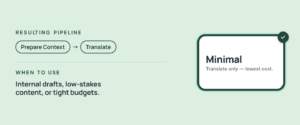
1. Minimal preset
The most common cause of AI failure is contextual blindness, where an LLM translates a string without understanding its environment. Even in a cost-optimized, minimal workflow, direct translation is a risk. The approach begins with a Context Preparation phase that analyzes project metadata before the first word is translated. This prevents the AI from making fundamental errors that occur when AI is forced to guess.
For example, even when using a Minimal AI Pipeline preset, AI can identify whether the word open refers to a file menu or an electrical circuit, grounding the translation in reality before it even begins.
2. Standard preset
For customer-facing UI, accuracy is only the baseline. The real challenge is prompt adherence. The Standard preset moves beyond simple translation generation by introducing a Self-Correction Layer. Most AI errors happen because the model ‘forgets’ the rules mid-sentence. By adding a dedicated step, the system compares the output against the specific glossary and technical constraints provided. If the AI detects a mismatch (such as a broken HTML tag or a tone that is too formal), it triggers an immediate self-correction, ensuring the final string is both linguistically natural and technically functional.
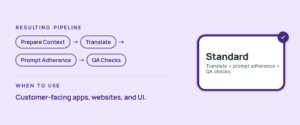
3. Thorough preset
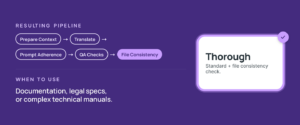
In technical documentation or long articles, consistency within a single file is critical. The thorough preset adds a File Consistency check. This step analyzes the document currently being translated to ensure new updates match the terminology and style of the existing content.
- Previously: AI translated the new strings in isolation. This often led to shifts in terminology or tone within the same document, making it obvious which parts were updated later.
- Now: The File Consistency step analyzes the entire file you are currently translating. It uses the existing sentences as a reference to ensure the new 10% matches the terminology and style of the other 90%.
When to use it? This is a specialized tool for long-form content like documentation, help articles, or legal specs. For simple resource files (like a list of random app buttons), you can skip it, but for narrative or technical flow, it’s a must.
Solving the ambiguity in AI translations
The biggest risk in AI translation is when the system is forced to guess. When an LLM encounters a word with multiple meanings (and no clear context), it doesn’t stop to ask for help. AI is forced to make a statistical guess. In many UI/UX scenarios, a 50/50 guess can break the user experience.
Consider the word User. In English, it is neutral. In languages like French or Spanish, you must choose: is the user male or female?
- Previously: The AI usually defaults to the masculine form. If your application context requires a female or neutral address, your entire UI suddenly feels “off” or grammatically incorrect.
- Now: Ambiguity Filter identifies these gender-sensitive or multi-meaning words. Instead of guessing, the system recognizes it lacks context and flags the string for review.
The Filter out step can be added to any pipeline, from the simplest to the most complex. This ensures that even your fastest workflows have an option to prevent hallucinations when context is missing.
How to solve those flagged strings at scale
You might worry that filtering hundreds of strings will create a mountain of manual work. However, try using the AI Pipeline alongside the Crowdin Copilot for such tasks. It can save your time with:
- Smart Grouping: Copilot doesn’t make you solve 100 individual issues. It groups similar ambiguities together. If the word User appears in 50 places with the same missing context, you resolve it once, and Copilot applies the fix to all 50.
- Rapid Context: You give the AI a tiny hint, and it handles the complex grammatical issues across all related strings.
Choose your trade-off: quality, time, or costs
Let’s be honest: there is no such thing as a perfect and instant translation. Adding specialized layers like Context Preparation, Prompt Adherence, and Ambiguity Filtering makes the translation process slower. Because the AI is actually “thinking” (auditing its work and scanning your history), it consumes more tokens and takes more time to complete. However, in today’s localization, the real cost isn’t in the tokens; it’s in the cleanup. Users have a choice:
- Fast results that work well for low-stakes content. However, these often require more human proofreader time afterward to manually fix glossary mismatches, broken tags, or gender context errors.
or
- A slightly slower, more expensive AI pipeline that translates perfectly the first time. By spending a few more minutes in the AI phase, you can reduce the manual cleanup needed later.
It is a simple equation of where your team wants to spend more time. Organizations can either have a fast AI and a slow human review, or a thorough AI that delivers results ready for immediate use.
Customized AI Pipeline
While these presets (Minimal, Standard, and Thorough) cover the vast majority of localization needs, we know that enterprise workflows aren’t always standard. Custom pipelines remain available for teams that need to build their own logic from scratch. Whether you have a unique multi-step approval process or a highly specific AI prompt, you aren’t forced into a preset. You can take the best parts of this tiered approach and modify them to fit your exact internal requirements.
Customization goes beyond just the order of steps. For those who want to optimize their budget or performance, the AI Pipeline app lets you select a specific AI model for each step of the process.
Real control over the AI trade-off
The goal of these tiered pipelines isn’t to replace human judgment, but to provide the controls localization managers have traditionally lacked. AI localization is no longer a “take what you get” situation. It is now a strategic choice based on your project’s needs.
With Crowdin AI Pipeline, teams now have the flexibility to decide exactly how to spend their time and budget:
- Minimal: For when speed is your only priority, and the risks are low.
- Standard: For when your code and brand terms are non-negotiable.
- Thorough: For when document-wide consistency is the only way to maintain your professional voice.
By providing these presets, Crowdin is moving away from the black box of AI. Users no longer have to settle for a single, unpredictable result. Instead, teams can align Al pipelines with their goals.


